Print, Audio or Screen: Matching a Format to the Material
Match news to print, audio or screen by asking what readers need to notice, compare or hear, then choose the format that makes that task clearest.
A council agenda lands beside your mug, dense with names, dates and proposed changes. News format choice starts with what a reader needs to do with that information: compare clauses, hear a speaker’s emphasis or see which streets a new boundary crosses. Print, audio and screen each make some tasks easier and others harder.
They are not interchangeable containers. A page supports scanning and comparison; audio gives sequence, voice and sound a leading role; a screen can combine words with images, maps and interaction. Choose by the job the material must perform, not by habit.
Print helps readers pause and compare
Text on a page suits information people may want to inspect at their own pace. Names, dates, clauses, lists of options and linked explanations are easier to revisit when they remain visible. A reader can move back a paragraph, compare two details or search for a place name without waiting for a narrator to repeat it.
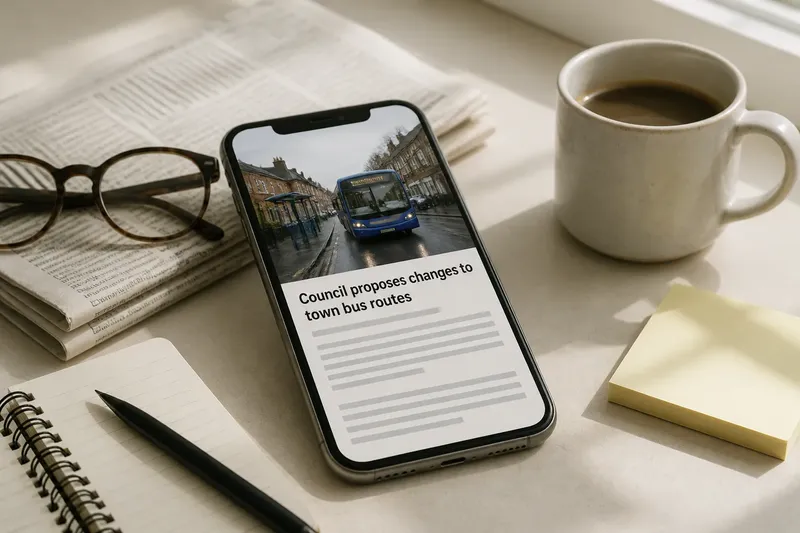
That makes print a strong fit for a story with conditions or exceptions. A report on proposed bus-route changes, for instance, may need to explain which streets are affected, what the authority says and how residents can respond. Clear subheadings, short paragraphs and a list of routes help readers find the detail that concerns them.
Text also allows careful qualification. If a decision is proposed rather than final, a precise sentence can keep that distinction beside the relevant claim. This is especially useful when a story contains caveats, competing explanations or terminology readers may want to check later.
Print is less suited to conveying a feeling that depends on tone, movement or sound. A transcript can preserve a witness’s words, but not fully convey a pause, a crowd’s reaction or the texture of a place. Nor does a long block of prose automatically clarify a complicated subject; readers still need structure and signposts.
Audio gives voice and sequence room
Audio is useful when the order in which information unfolds matters. A reporter can guide listeners from a scene to an explanation, then introduce a source whose voice adds context. Natural sound—a train announcement, a market hum, a door closing—can establish a setting more directly than description, provided it contributes something beyond atmosphere.
Audio also suits an interview or spoken performance that is central to the story. A person’s choice of words, correction or hesitation may matter. A written quotation captures language; a recording also carries pace and emphasis. Handle those signals thoughtfully rather than treating them as a shortcut to judging someone’s credibility.
Listeners cannot glance back at a previous sentence as easily as readers can. Audio therefore benefits from a clear route through the material, uncluttered explanations and verbal reminders of names or relationships when they matter. A complicated table, long list of addresses or passage full of similar-sounding names may be awkward to absorb by ear.
Accessibility matters here, too. A transcript lets people read an audio story and helps listeners check names or details. It should reflect what the recording says without pretending that sound and text provide identical experiences. If a sound matters to the story, a brief description can explain its relevance for someone who cannot hear it.
Screens make space, movement and interaction visible
A screen can bring words together with photographs, video, maps, diagrams, captions and controls. This helps when the relationship between elements is part of the story: where a fire spread, how a building changed, or which streets a new boundary includes. A well-labelled map can make a spatial pattern easier to grasp than several paragraphs alone.
Moving images can show a sequence that would be difficult to describe, while captions can identify speakers or supply context without relying on sound. But movement is not automatically informative. A clip needs to show something relevant, and an animation needs to make the underlying change understandable rather than merely striking.
Interactive material asks readers to take an action, such as selecting a neighbourhood or comparing two options. Use it when that choice helps people answer a genuine question. If a short table or map can supply the same answer, an interaction may add effort without insight. Keep labels visible, make controls understandable and provide an alternative for people whose device or access needs do not suit the feature.
On a small screen, a crowded chart or tiny map can be harder to use than a plain explanation. Readers may also be on a slow connection, in a noisy place or unable to play audio. A strong screen story offers essential information in a form that does not depend on one device feature working.
Which format suits exact details, sound and place?
For dates, names and conditions, make the information available as clearly organised text, whether on a printed page or alongside a screen feature. For a scene that depends on sound, use audio with context and a transcript or description. For a change of place or boundary, use a labelled map or diagram and name affected locations in text.
What works best for dates, names and conditions?
Use print, or a clearly organised text layer on screen, when readers need to check exact wording and compare details. Audio can introduce the issue, but a transcript or accompanying text helps when precision matters.
What works best for a scene that depends on sound?
Audio is a natural choice when speech, ambience or timing conveys information that words alone would flatten. Add enough context for the sound to make sense, and offer a transcript or description as another route.
What works best for showing where a change happens?
A map or diagram on screen can make location and boundaries visible at a glance. Pair it with text naming affected places, so the story remains usable without the visual.
What if the story needs all three formats?
Choose one format to carry the main task, then use others only where they add a distinct kind of evidence or access. A text explanation with a short audio clip and a useful map can serve different needs; repeating the same account in every mode can simply make the story longer.
A local bridge story shows how formats can divide the work
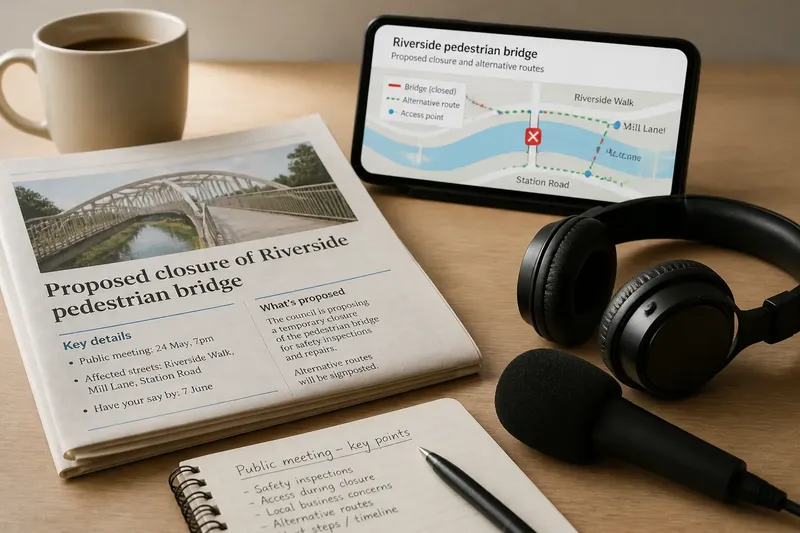
Imagine a local newsroom covering a proposed closure of a pedestrian bridge. The starting material is a council notice naming the bridge, a list of streets on either side and a date for a public meeting. The editor first identifies the reader’s main task: finding out which routes would change. The newsroom puts a labelled map beside a text list of affected streets, then checks that the labels match the notice. A short audio clip from a nearby crossing captures traffic noise that explains the setting; the written account states that the closure is proposed and gives the meeting details. The result is a story with a visual route aid, a sound that adds context and text readers can revisit. If the clip contributes no useful context, or the map merely repeats a short street list, those elements can be left out.
Not every story needs several formats. If the bridge report contains no meaningful sound and a map adds no clarity beyond a street list, structured text may serve readers better. It is not worth adding video, audio or interactive controls just because the publishing system offers them. Each extra element brings production and accessibility work, and can distract from the information readers came to find.
Check the reader’s task before choosing
Use these checks to decide what to publish. Each observation points to a choice, with an alternative if the first format does not fit.
- Check the main reader task. If readers must compare clauses or options, use visible text; if they must follow a spoken exchange, consider audio and provide a transcript.
- Check whether details need revisiting. If names, dates, conditions or contact details must be checked, keep them in text; if they are incidental, audio may carry the account with a brief written reference.
- Check what sound contributes. If removing a clip would remove meaningful evidence or context, include audio with a transcript; if not, use a concise written description or omit the clip.
- Check what the visual reveals. If a map, chart or video makes a relationship clearer than prose, include it with labels and text; if it does not, explain the point in words instead.
- Check whether an interaction answers a real question. If a reader’s selection changes the answer, make the control clear and offer an accessible alternative; if the result is the same for everyone, use a table or map.
- Check the alternative route. If essential information depends on sound or an image, provide a transcript, caption or text description; if the alternative would merely duplicate decoration, remove the non-essential element.
Format choices depend on the material and the audience’s circumstances. A breaking update may call for concise text; a recorded speech may benefit from audio; a boundary change may need a map. When one format carries the essential account, keep the others supplementary rather than forcing every reader through the same path.
For the next assignment, write down the one thing a reader should be able to notice, hear or compare. News format choice becomes clearer when that task is explicit: select the form that makes it easiest, then keep the essential information available through another route where needed.